
What Is PS2 BIOS and Why It Matters So Much for Emulators and Smooth Gaming
People who attempt to use PlayStation 2 emulators usually encounter problems that prevent game launching and proper save functions and cause general gameplay issues because they have not obtained the required PS2 BIOS file.
I have installed PS2 emulation on various PCs during my career which includes both outdated laptops and powerful systems that can handle any game. The BIOS serves as the essential component because it establishes the core system for PS2 emulation. The correct PS2 BIOS enables users to experience authentic PS2 console gameplay through their emulators. The system will fail to function properly when users have either incorrect system components or missing essential system components.
In this guide, I will tell you all about the PS2 BIOS while showing you how to select the appropriate version for their games and create legal emulator operations that replicate actual PS2 system behavior.
What is a PS2 BIOS?
The term Basic Input/Output System defines BIOS in full but PlayStation 2 users should understand BIOS better as the fundamental operating system of their gaming console.
On a real PS2, the BIOS is the internal software that:
- boots the console,
- initializes hardware,
- loads the system menu,
- and provides low-level functions games depend on.
On an emulator, that BIOS file becomes a critical piece that helps your computer (or phone) behave like a PS2.
The BIOS operates as the nervous system for PS2 emulators which function as digital copies of original console systems. The emulator will not function properly because it lacks essential components that build complete functioning systems.
What the PS2 BIOS actually does
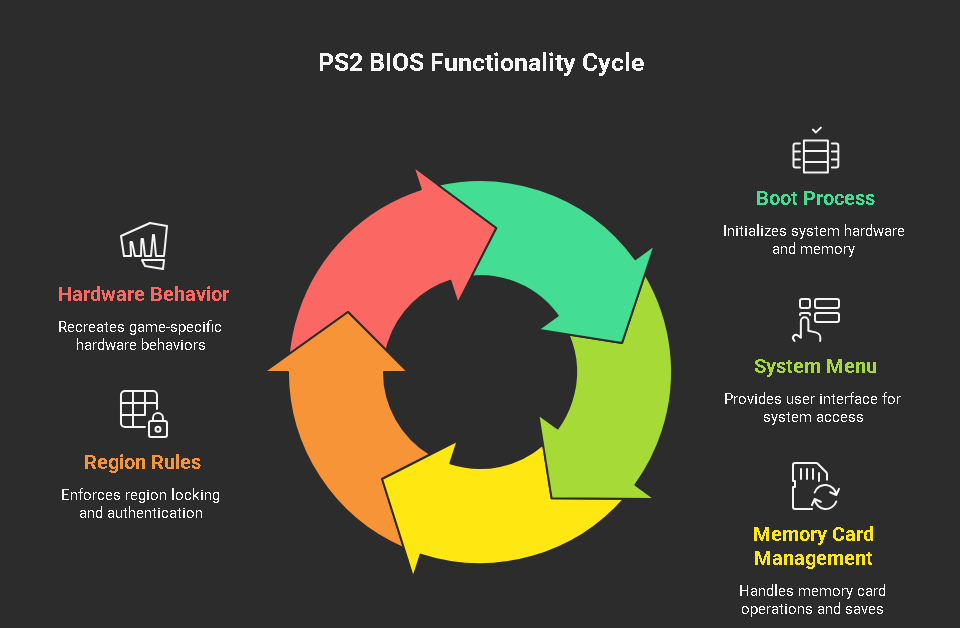
The Power-on self-test process establishes system readiness which PlayStation 2 consoles execute before entering their operating mode. The BIOS manages various system activities which include.
1) Boot process and system checks
The BIOS runs hardware checks and sets up the PS2 environment. That includes preparing things like system memory, basic device interfaces, and boot routines.
2) The PS2 system menu
That classic PS2 browser screen (memory card/disc menu) isn’t the “game”—it’s the system interface provided by the BIOS and related system components.
3) Memory card management
On original hardware, the BIOS handles how memory cards are accessed and how saves are written/read. In an emulator, this translates into virtual memory cards. If the BIOS isn’t right, saving can become unreliable or fail completely.
4) Region rules and disc authentication behavior
The PS2 system implemented region locking to restrict access to specific geographical areas. The BIOS functions as a system component that enforces region requirements that include NTSC-U and PAL and NTSC-J standards. Your emulation experience will become better when your game region matches the region of your BIOS system.
5) Hardware-level behavior games expect
A lot of PS2 games were built around the PS2’s quirks—timing, system calls, device behavior. The BIOS helps recreate those behaviors accurately.
How the BIOS works inside an emulator
A PS2 emulator (like PCSX2 on PC) simulates PS2 hardware. But emulation isn’t just “raw power.” It’s also about accuracy.
The BIOS gives the emulator:
- real PS2 startup routines,
- real PS2 system calls,
- and the expected environment many games assume exists.
When your emulator loads a game, it’s not just reading the disc image and guessing what to do. It often relies on BIOS-level functions to handle specific system interactions.
That’s why, in practice, the BIOS is one of the first things you must configure—because it’s what allows the emulator to behave like a PS2 instead of a rough imitation
Why the PS2 BIOS is essential for emulation
In my own setups, the moment the correct BIOS is in place, everything gets easier: fewer boot issues, fewer weird crashes, and much more consistent behavior across games.
Here’s what the BIOS directly improves:
Runs games correctly and reliably
Without the proper BIOS, you’ll commonly see:
- black screen on boot,
- games freezing after the intro,
- random crashes,
- broken cutscenes,
- missing effects or strange graphics behavior.
Some games are more forgiving than others, but for real stability, BIOS accuracy matters.
Activates key system features
A proper BIOS enables features that make PS2 emulation feel complete:
- memory card support (saving/loading),
- proper boot flow,
- correct handling of console settings.
If you care about playing like it’s a real console—saving progress, switching titles, consistent menus—the BIOS is part of that experience.
Helps maintain stability (and reduces “mystery problems”)
A lot of “PCSX2 is buggy” complaints are actually:
- wrong BIOS region,
- corrupted BIOS dump,
- wrong BIOS placement,
- or a bad configuration caused by BIOS not being detected properly.
When the BIOS is correct, you remove an entire category of issues.
Why the PS2 BIOS still matters for gaming performance
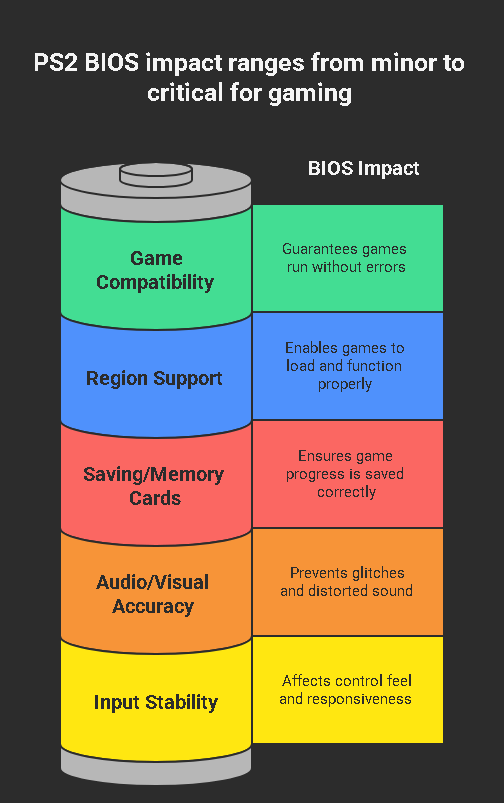
People usually think performance is all CPU/GPU. Yes—your device matters. But the BIOS has a strong indirect impact on performance because it affects:
Game compatibility
Some titles just won’t run properly without a valid BIOS. Others might run but have persistent issues.
Region support
A common problem I’ve seen: you boot a game and it refuses to load or behaves strangely—then you realize you’re using a BIOS from a different region.
As a general rule:
- NTSC-U BIOS pairs best with North American releases
- PAL BIOS pairs best with European/Australian releases
- NTSC-J BIOS pairs best with Japanese releases
Saving and virtual memory cards
If saving fails, it ruins the entire experience. The BIOS is closely tied to memory-card behavior.
Audio/visual accuracy
Wrong or incompatible BIOS setups can contribute to:
- crackling audio,
- distorted sound,
- odd timing issues,
- visual glitches that don’t show up with a proper BIOS.
Input/controls stability
This one surprises people: the “feel” of controls in some games is influenced by timing and system behavior. A correct BIOS helps the emulator reproduce expected behavior more consistently.
Types of PS2 BIOS files (region + model)
Not all PS2 BIOS files are the same. They differ by region and console model/revision.
Region-based BIOS types
The main regions you’ll see:
- NTSC-U (USA / North America)
- PAL (Europe / Australia)
- NTSC-J (Japan)
SCPH model numbers (what they mean)
BIOS files are often labeled with a model family like:
- SCPH-10000 (early Japan models)
- SCPH-30001 / 39001 (popular “fat” North America models)
- SCPH-700xx / 900xx (later slim models)
In my experience, many “middle-era” fat-console BIOS versions are widely compatible, but there isn’t a single magical file that’s perfect for every edge case. Think of it like drivers—some revisions behave slightly differently.
Which BIOS is best for PCSX2?
If you’re using PCSX2, a widely used and stable BIOS revision tends to be the easiest path because:
- it’s well-tested by the community,
- emulator devs have seen it in the wild,
- and it usually behaves predictably.
Many players like BIOS dumps from common retail units (often fat models) because of broad compatibility. The important part isn’t chasing a mythic “best BIOS”—it’s making sure you have:
- a clean, correct dump,
- the right region for your game, and
- a PCSX2 build that’s up to date.
That combination solves the majority of problems.
How to choose the right BIOS for your games
Here’s the approach I personally use (and what I recommend you do too):
1) Match BIOS region to the game region
If you mostly play US releases, stick to NTSC-U.
If you mostly play European releases, stick to PAL.
Region mismatch doesn’t always break things, but when it does, it wastes your time.
2) Keep multiple BIOS files if you play across regions
This is completely normal. You can store multiple BIOS files and switch inside your emulator settings depending on what you’re playing.
3) Use compatibility notes when a specific game is picky
If you run into one stubborn title, check emulator compatibility notes and community reports. Sometimes a specific BIOS revision behaves better for a specific title.
Can you run a PS2 emulator without a BIOS?
For PS2 emulation, a BIOS is effectively required for proper, reliable results.
Some emulators in the broader console-emulation world offer “high-level emulation” (HLE) BIOS replacements. In PS2’s case, accuracy and compatibility are much better when using a real BIOS dump.
So if your question is: “Can I emulate PS2 properly without BIOS?”
In practical terms: no.
Best devices for PS2 emulation today
I’ll keep this real: you can run PS2 games on many devices now, but your experience depends heavily on hardware and software support.
1) PC (Windows / Linux / macOS)
A PC is still the most reliable route for PS2 emulation:
- best performance options,
- best controller support,
- easiest file management,
- and the most mature emulator ecosystem.
For smooth play, aim for:
- a modern multi-core CPU,
- 8GB+ RAM,
- and a decent GPU (even midrange is fine for many titles).
2) Android phones (high-end)
Some high-end Android phones can run PS2 games well, but performance varies a lot by chip.
Look for:
- strong sustained performance (not just benchmark bursts),
- good thermal handling,
- and enough RAM (8GB+ is a comfortable target).
3) Handheld PCs (Steam Deck / similar)
Handheld PCs are excellent for PS2 emulation because they’re basically gaming PCs in a portable shell. If you want the “PS2 in your hands” feeling without fighting mobile limitations, this category is a sweet spot.
4) Tablets and gaming laptops
Gaming laptops are usually more than enough. Tablets can be hit-or-miss depending on chipset and emulator availability, but high-end models can do well.
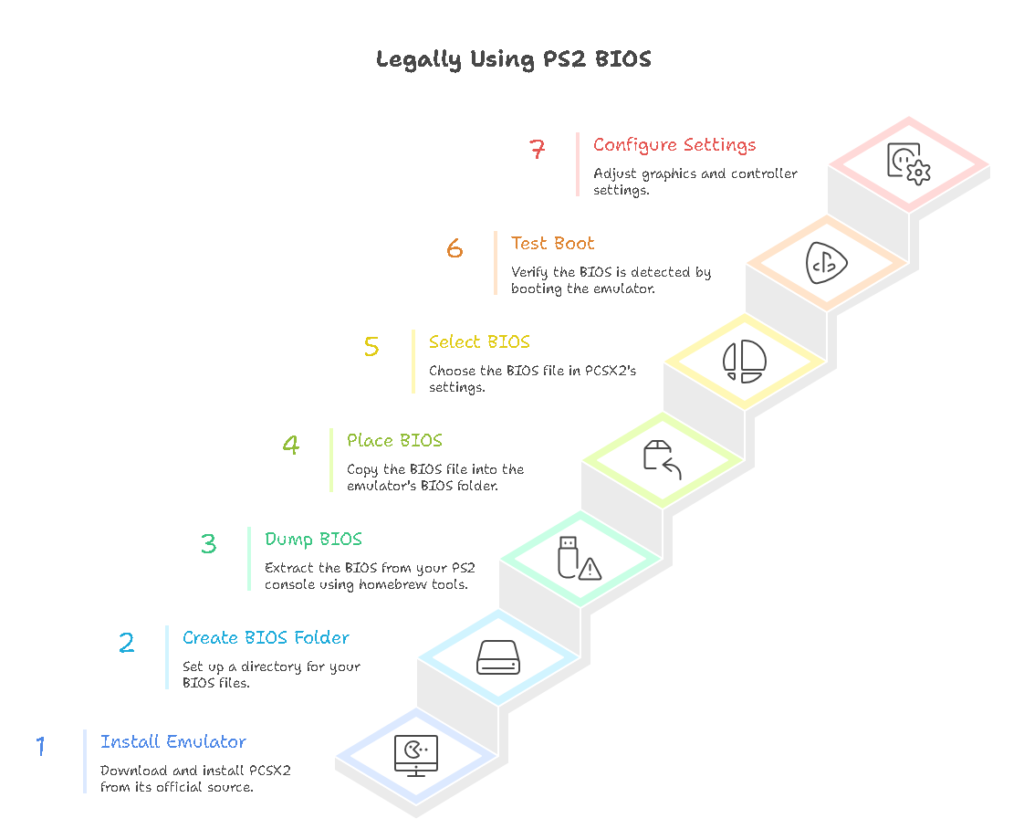
How to set up PS2 emulation using a BIOS (legal method)
Important: The PS2 BIOS is copyrighted by Sony.
The legal way to use it is to dump it from your own PS2 console.
I’m not going to point you to random downloads, because that’s where people end up with:
- corrupted BIOS files,
- malware,
- or the wrong region/revision.
Here’s the clean approach.
Step 1: Install your emulator (PCSX2 on PC)
Download PCSX2 only from its official source. Install it and run it once so it creates its folders and default config.
Step 2: Create/locate your BIOS folder
PCSX2 typically expects a BIOS directory. In most cases, PCSX2 lets you choose the BIOS path in settings.
Step 3: Dump the BIOS from your own PS2
You can dump a BIOS using homebrew tools on a real PS2 (commonly done with setups that use utilities such as BIOS dumper tools). The result is usually a .bin file.
You’ll copy that BIOS dump onto a USB drive and move it to your PC.
Step 4: Place BIOS into the emulator BIOS directory
Put the BIOS .bin file in the BIOS folder. Keep filenames simple and unchanged.
Step 5: Select the BIOS in the emulator settings
Open PCSX2 → BIOS settings → choose the BIOS you placed in the folder.
Step 6: Test boot
A simple test I always do:
- boot the emulator without loading a game,
- confirm you can reach the PS2 system menu.
If the PS2 menu appears, your BIOS is being detected and functioning.
Step 7: Configure graphics and controller
Only after BIOS is confirmed, I set:
- renderer (Vulkan/DirectX/OpenGL depending on platform),
- internal resolution,
- controller mapping,
- and any speed tweaks carefully (one at a time).
That order matters. If you tweak everything before verifying BIOS, you won’t know what caused a problem.
Common PS2 BIOS errors (and how I fix them)
These are the issues I see most often:
“BIOS not found” / “No BIOS detected”
Fix:
- confirm the BIOS is in the correct folder,
- confirm it’s unzipped (still a common mistake),
- confirm PCSX2 is pointed to the correct BIOS directory.
BIOS shows up but games won’t boot (black screen)
Fix:
- test boot into PS2 menu first,
- verify the BIOS dump isn’t corrupted (re-dump if needed),
- try matching BIOS region to the game region.
Saving doesn’t work / memory card issues
Fix:
- ensure virtual memory card is enabled/created,
- check file permissions (especially on Linux/macOS),
- try a fresh memory card file if it’s corrupted.
Random crashes after changing settings
Fix:
- revert aggressive speed hacks,
- confirm you didn’t switch BIOS to an incompatible region,
- update emulator build (nightly/dev builds often fix game-specific issues).
Tips for better PS2 emulation performance
Once BIOS is correct, performance tuning becomes much easier.
BIOS-related best practices
- Use a clean dump from your own console
- Keep multiple BIOS versions if you play multiple regions
- Don’t rename or modify BIOS files unnecessarily
Emulator settings that actually help (without breaking everything)
What I do in real setups:
- Internal resolution: start at native/2x. Increase only if stable.
- Renderer: try Vulkan or DirectX on Windows; OpenGL can help certain edge cases.
- Speed hacks: use lightly. Test one change at a time.
- Frame limiting: keep it on for consistent timing in many games.
- Audio settings: if you hear crackle, reduce load (resolution/speed hacks) before chasing exotic fixes.
If you want the “real PS2 feel,” stability beats extreme settings every time.
Final thoughts
The PS2 BIOS isn’t some optional add-on, it’s the core system layer that makes PS2 emulation behave like actual PS2 hardware. When you get the BIOS part right, everything improves: boot reliability, saving, compatibility, and overall smoothness.
If you’re setting up PS2 emulation for the first time, my honest advice is: slow down and do the BIOS step carefully. It saves you hours later—and it’s the difference between “it kind of runs” and “this feels like a PS2.”
FAQ
Do Android PS2 emulators require a BIOS too?
Yes. If the emulator is aiming for real PS2 accuracy, it typically needs a valid BIOS to boot and run games reliably.
Is it legal to download a PS2 BIOS from the internet?
In most cases, no. The safer, legal route is dumping the BIOS from a PS2 console you personally own.
Can I keep more than one BIOS file?
Yes—and if you play games from multiple regions, it’s smart to keep multiple BIOS files and switch depending on the game.
Why does region matter so much?
Because PS2 games and systems were built with region rules (PAL vs NTSC timing, region lock expectations). Matching regions reduces weird compatibility problems.