7 Free PS2 Emulators for PC (Windows, Mac, and iOS) in 2026
The initial attempt to play PlayStation 2 games on my computer through emulation failed because I expected the process to work as follows: install emulator → load game → play. The system responded to me with two problems, which resulted in missing BIOS errors, black screens, audio crackling, and settings menus that resembled a pilot cockpit.
I understand your current situation because I have been there myself. The good news about PS2 emulation has become easier to achieve in 2026 because you need to select the correct emulator for your device and establish practical expectations.
In this guide, I’m going to walk you through 7 free PS2 emulation options (mostly PC-focused, with honest notes for macOS and iOS). I’ll also tell you which ones I’d personally use depending on whether you want accuracy, performance, or a simple setup.
/
What is a PS2 emulator (and what does it actually do)?
A PS2 emulator allows users to run PlayStation 2 games on their computers and mobile devices by simulating the PlayStation 2 hardware. Your emulator uses the game data, which you created through ISO/CHD extraction from your disc to convert PS2 instructions into a format that your computer or phone can comprehend.
PS2 emulation requires more computer resources than older consoles because their multiple complex components (CPU, GPU, sound processor, etc.) work together to create PS2 games. The PS1 emulator needs only basic system requirements because users can run it on almost any device, but PS2 emulation requires users to have high CPU power.
Minimum vs recommended requirements (what I’ve found “actually playable”)
Here’s a practical requirements table based on what tends to work in real life (not just “it launches”).
Hardware Requirements for Smooth PS2 Emulation (2026)
| Minimum (basic playability) | Dual-core ~2.5GHz | 4GB | DX11/OpenGL 3.3 compatible | 2–5GB free | Many games will need low settings and native resolution |
| Recommended (good experience) | Modern quad-core (Intel i5 / Ryzen 5+) | 8GB+ | GTX 1650 / RX 570 or better | SSD preferred | Stable 60fps in many titles + upscaling options |
| macOS (good experience) | Apple Silicon (M1/M2+) or strong Intel | 8GB+ | Integrated Apple GPU (Metal) | SSD preferred | Works well, but some graphics backends differ vs Windows |
| iOS (realistic) | iPhone 12/13+ | 4GB+ | N/A | 5GB free | PS2 on iOS is still limited; expect partial compatibility |
My advice: For PS2, CPU matters more than people expect. A powerful GPU helps with upscaling and effects, but a weak CPU will still bottleneck performance.
What to consider before choosing an emulator (this saves you hours)
When people ask me “Which PS2 emulator is best?”, I always ask back:
- What device are you using? (Windows PC, Mac, iPhone/iPad)
- Do you want simple or customizable?
- Are you okay tweaking settings?
- Do you need maximum compatibility for popular games?
Also, one critical thing:
BIOS requirement (important, and I’ll be straight with you)
The majority of PS2 emulators need a PS2 BIOS file to start games successfully. Reputable emulators do not include BIOS because it consists of copyrighted Sony firmware. The legal method requires users to dump their BIOS from an owned PS2 which they can do in areas where this practice is permitted.
I’m not going to direct you to random BIOS download sites. That’s where a lot of people pick up malware or broken BIOS files.
The 7 best free PS2 emulator options (Windows, Mac, iOS + a couple of “honorable mentions”)
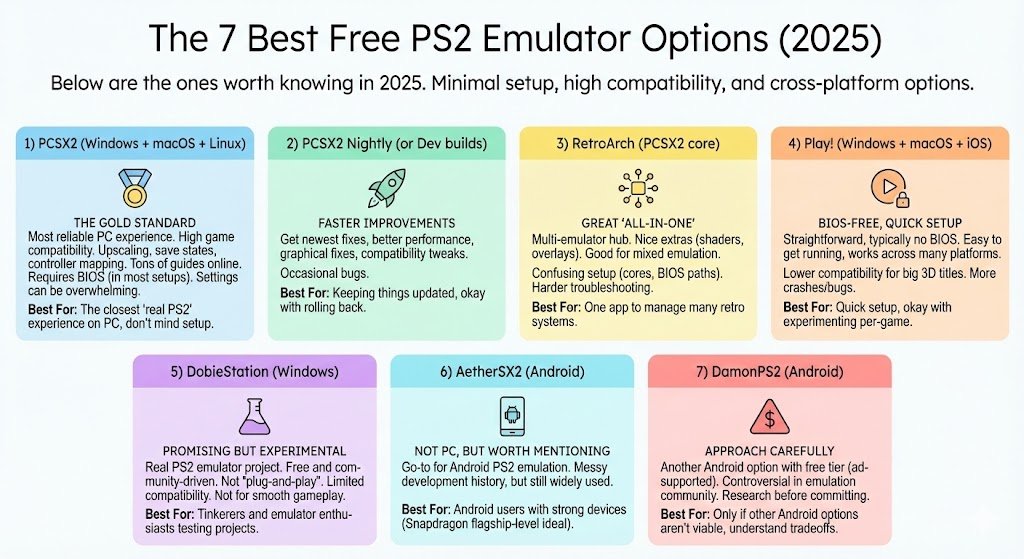
Below are the ones worth knowing in 2026.
1) PCSX2 (Windows + macOS + Linux) — the gold standard

If you want the most reliable PS2 experience on PC, PCSX2 is the one I come back to. It’s been developed for years, it has strong community support, and the compatibility is excellent.
What I like (real usage):
- High game compatibility
- Great performance on mid-range and high-end PCs
- Upscaling, widescreen patches, save states, controller mapping
- Tons of guides and troubleshooting info online
What you should know:
- You’ll need a BIOS (in most setups)
- The settings can feel overwhelming at first
Best for: You want the closest “real PS2” experience on a PC and you don’t mind a bit of setup.
2) PCSX2 Nightly (or Dev builds) — same emulator, faster improvements

I’m listing this separately because this is what I personally run when I want the newest fixes. Nightly/dev builds often improve:
- performance in specific games
- graphical fixes
- compatibility tweaks
Downside: Occasionally, a new build can introduce a bug. (Not common, but it happens.)
Best for: You like keeping things updated and you don’t mind rolling back if a build acts weird.
3) RetroArch (PCSX2 core) — great “all-in-one,” not always simplest

RetroArch is more of a multi-emulator hub than a single emulator. You install cores (emulation engines) inside it—one of which can be PS2-based.
What I like:
- One interface for many consoles
- Nice extras (shaders, overlays, unified controller profiles)
- Good if you emulate PS1/PS2/GBA/etc. together
What I don’t love:
- Setup can be confusing (cores, BIOS paths, permissions)
- Troubleshooting can be harder than standalone PCSX2
Best for: You want one app to manage many retro systems.
4) Play! (Windows + macOS + iOS) — BIOS-free, but lower compatibility

Play! is the one people love because it’s straightforward and typically doesn’t require a BIOS. That alone makes it attractive—especially if you’re just testing.
But I’ll be honest: compatibility is still not in the same league as PCSX2 for many big 3D titles.
What I like:
- Very easy to get running
- Works across many platforms (including iOS in some form)
- Cleaner setup (no BIOS in many cases)
Limitations I’ve seen:
- More crashes/visual bugs depending on the game
- Some games are slow even on good hardware
Best for: You want quick setup and you’re okay with experimenting per-game.
5) DobieStation (Windows) — promising but experimental
DobieStation is a real PS2 emulator project, but it’s still not “plug-and-play” for most people. I’m including it because people search for alternatives—and this is one of the few legitimate projects outside PCSX2/Play!.
Pros:
- Interesting development direction
- Free and community-driven
Cons:
- Limited compatibility
- Not the best choice if your goal is “play through my old favorites smoothly”
Best for: Tinkerers and emulator enthusiasts who like testing projects.
6) AetherSX2 (Android) — not a PC emulator, but worth mentioning

Even though your question is PC/macOS/iOS, I’m including AetherSX2 because many people game more on phones/tablets than on full PCs.
AetherSX2 became a go-to for Android PS2 emulation. Official development has been messy over time, but if you already use Android and you want PS2 on the go, it’s still a name you’ll see a lot.
Best for: Android users with strong devices (Snapdragon flagship-level is ideal).
Note: I treat Android PS2 emulation as device-dependent. Two phones with “8GB RAM” can perform wildly differently based on chipset and cooling.
7) DamonPS2 (Android) — runs on some devices, but approach carefully

DamonPS2 offers users a free Android emulator which includes advertisements during its basic tier and also provides paid versions. The emulation community has debated this application for multiple reasons which creates a need to investigate current community opinions before you spend time or money.
Best for: Only if AetherSX2/other options aren’t viable on your device and you understand the tradeoffs.
Quick comparison table (so you can choose fast)
PS2 Emulator Comparison (2026)
| PCSX2 | Windows/macOS/Linux | Usually yes | Medium | Excellent | Most PC players |
| PCSX2 Nightly/Dev | Windows/macOS/Linux | Usually yes | Medium | Excellent (latest fixes) | People who want newest improvements |
| RetroArch (PS2 core) | Windows/macOS (+others) | Yes | Harder | Very good (if configured well) | “One app for everything” users |
| Play! | Windows/macOS/iOS/Android | Often no | Easy | Medium | Quick setup + experimentation |
| DobieStation | Windows | Varies | Advanced | Low–Medium | Emulator hobbyists/testers |
| AetherSX2 | Android | Yes | Medium | Good (device-dependent) | Phone/tablet PS2 gaming |
| DamonPS2 | Android | Yes | Medium | Varies | Last-resort Android option |
Windows 7 vs Windows 10/11 (what I’ve learned the hard way)
If you’re still on Windows 7, you might be able to run older builds of some emulators—but you’ll fight:
- older graphics drivers
- missing runtimes/dependencies
- poorer Vulkan/DirectX support
On Windows 10/11, things are simply smoother: better GPU drivers, better multi-core scheduling, and fewer random crashes.
If you can upgrade, upgrade. It’s not just about speed—it’s about stability.
macOS and iOS reality check (especially for people using iPhone)
macOS
macOS support is genuinely decent now (especially on Apple Silicon), but your mileage depends on:
- which emulator you choose (PCSX2 vs Play!)
- your macOS version and graphics backend support
iOS (iPhone/iPad)
I’ll be very upfront: PS2 emulation on iOS is still limited compared to Windows/macOS/Android. Even when you can install an emulator, performance and compatibility are not at “PCSX2 on PC” level—partly due to iOS restrictions and how iOS handles JIT/performance for emulation.
If you want to try on iOS, Play! is usually the first place people start. Just keep expectations realistic.
My personal recommendations (if you just want the answer)
- Best overall (Windows/macOS): PCSX2
- Best “latest improvements” (Windows/macOS): PCSX2 Nightly/Dev builds
- Best if you emulate many consoles: RetroArch (but only if you’re comfortable configuring it)
- Best “simple + BIOS-free approach”: Play!
- Best for Android gaming: AetherSX2 (device dependent)
FAQs
Do all PS2 emulators need a BIOS?
No. Some (like Play! in many setups) aim to work without a BIOS. But PCSX2 typically expects a BIOS, and compatibility is often best with correct BIOS setup.
Can I use my original PS2 discs?
Yes—many people dump their own discs into ISO/CHD format for use with an emulator. That’s the cleanest approach if you still have your collection.
Why does one game run perfectly and another one stutters?
That’s normal. PS2 games pushed the hardware in different ways. Some titles emulate easily; others need specific settings, stronger CPU, or renderer changes.
Is iOS good for PS2 emulation in 2026?
It’s improving, but it’s still the most limited mainstream platform for PS2 emulation. If PS2 on-the-go is your goal, Android often has an easier path.