
Which PS2 BIOS to Use for the Best Emulator Performance in 2026
If you want smooth PS2 emulation in 2026, your BIOS choice matters. Not for raw FPS in most games. It matters for boot success, timing, menus, saves, and fewer random crashes.
I test PS2 emulators often. When people ask me why a game hangs on a black screen, the pattern repeats: wrong region BIOS, bad dump, or missing side files like NVM.
You will get a clean result if you pick a BIOS dump from your own console, match region to your games, and keep more than one BIOS ready for edge cases.
Legal note: dump the BIOS from a PS2 you own. Keep it for personal use.
What Is a PS2 BIOS?
A PS2 BIOS is the system software inside the PlayStation 2. It runs at power on. It initializes hardware, handles memory cards, sets video mode, and starts discs.
PCSX2 and other PS2 emulators load a BIOS file to mirror that console behavior. No BIOS, no authentic boot process, and no accurate system functions.
I treat the BIOS like the foundation. If the foundation is cracked, every setting you change later feels unstable.
What “Best Performance” Means in 2026
Let’s define terms.
A BIOS almost never changes your in game FPS in a meaningful way. Your CPU, GPU, renderer, and game settings drive FPS.
A BIOS does affect:
- Boot reliability (no black screen loops)
- Region timing (PAL 50 Hz vs NTSC 60 Hz behavior)
- Save and memory card behavior
- System calls used by some games and homebrew
- Emulator accuracy features (less guessing)
Practical takeaway: pick the BIOS that matches your region and comes from a clean dump. Keep a second BIOS ready.
Popular PS2 BIOS Dumps by Console Model (SCPH Codes)
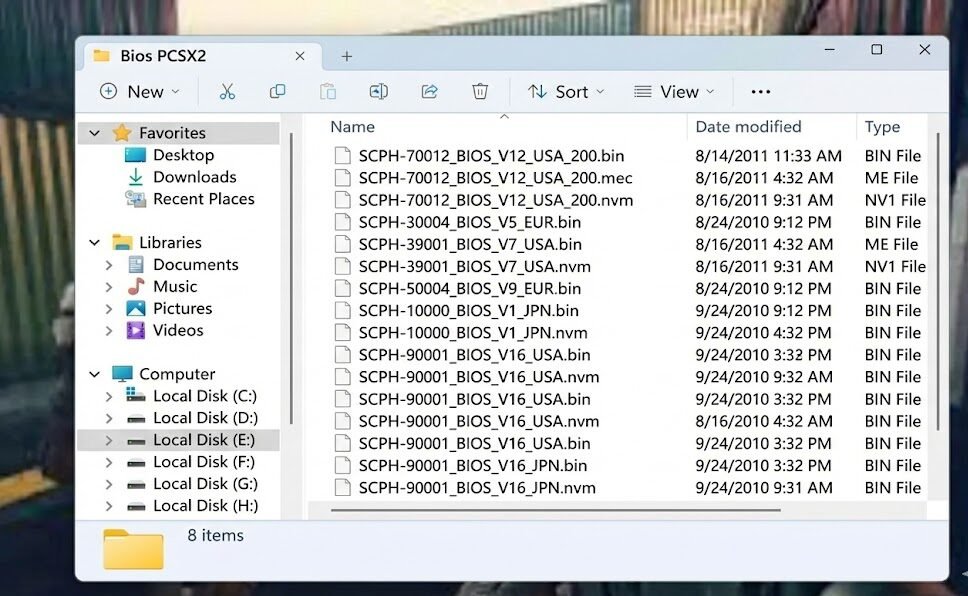
SCPH codes identify PS2 model families and regions. People use them as shorthand for BIOS dumps.
Common SCPH models people use in emulators
| SCPH model | Region | PS2 type | Why people pick it |
|---|---|---|---|
| SCPH-39001 | NTSC-U | Fat | Stable for older NTSC-U libraries |
| SCPH-50001 | NTSC-U | Fat | Solid middle era BIOS, wide compatibility |
| SCPH-70012 | NTSC-U | Slim | Popular “default” pick for PCSX2 users |
| SCPH-50004 | PAL | Fat | Good PAL compatibility for many titles |
| SCPH-70004 | PAL | Slim | Popular PAL slim pick |
| SCPH-10000 | NTSC-J | Fat (launch) | Useful for early Japanese releases |
Tip from my own setup: if you own more than one PS2, dump both BIOS sets. Some problem games behave better with a different revision.
Different Types of PS2 BIOS Files You Need to Know
A clean dump often includes more than one file. Many people copy one BIN and wonder why an emulator complains.
Typical PS2 BIOS related files
| File type | You will see names like | What it does |
|---|---|---|
| Main BIOS ROM | bios.bin, rom0 | Core firmware data |
| ROM1 | rom1 | Extra system data used by firmware |
| ROM2 | rom2 | Extra system modules on many units |
| EROM | erom | Often tied to DVD player functions |
| NVM | nvm | Console specific config storage |
| MEC | mec | Mechacon related data in some dumps |
PCSX2 often works with a single BIOS ROM file. Still, I store the full set together in one folder per console dump. It keeps things tidy and avoids missing file headaches later.
PS2 BIOS Version Numbers and Emulator Performance
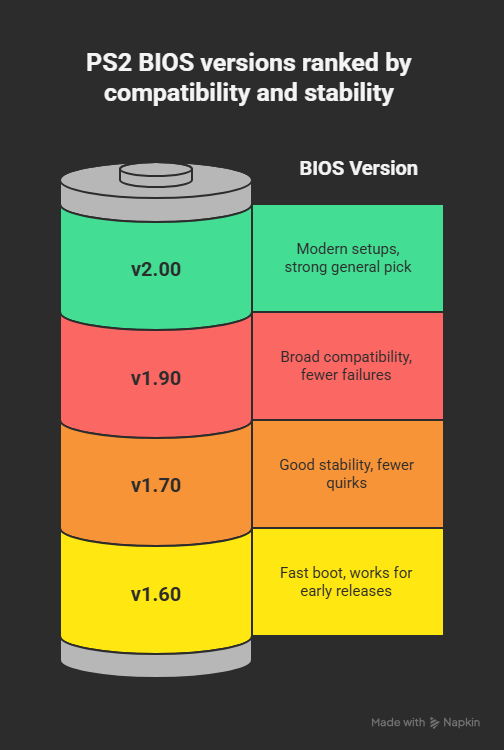
BIOS version numbers vary by console era. Newer does not mean “faster.” It often means different fixes, different DVD player versions, and different behavior with some games.
Below is a practical view, based on what I see in PCSX2 style workflows.
BIOS v1.60 (older)
Where it fits
- Early era game libraries
- People who want older system behavior for a specific title
Pros
- Fast boot feel
- Works well for many early releases
Cons
- More odd edge cases in later games
- Less consistent across modern emulator builds
BIOS v1.70 (mid era)
Where it fits
- Mixed libraries from early to mid PS2 life
Pros
- Good general stability
- Fewer menu and boot quirks than older revisions
Cons
- Some late era titles still prefer newer BIOS behavior
BIOS v1.90 (later)
Where it fits
- Wide game library, including late PS2 releases
Pros
- Broad compatibility
- Fewer random boot failures in my testing
Cons
- Slightly slower boot feel in some setups
BIOS v2.00 (late)
Where it fits
- Modern emulator setups with lots of quality of life options
Pros
- Good match for late slim era behavior
- Strong “one BIOS for most games” pick
Cons
- A few early oddball titles sometimes act better on older BIOS
Quick BIOS version guidance table
| Your library | My pick | Backup pick |
|---|---|---|
| Mostly early PS2 games | v1.60 to v1.70 | v1.90 |
| Mixed library | v1.90 | v2.00 |
| Mostly late PS2 games | v2.00 | v1.90 |
PS2 BIOS Regions Explained
Region affects video timing and game expectations.
Main PS2 regions
- NTSC-U: North America
- NTSC-J: Japan
- PAL: Europe, Australia, parts of Asia
Why region match matters
If you run a PAL game, the game often targets 50 Hz behavior. If you run an NTSC game, it often targets 60 Hz. Mismatching BIOS and game region adds friction.
You will often see:
- “Insert PlayStation or PlayStation 2 format disc” messages
- Black screens on boot
- Wrong speed feel
- Cutscene audio sync issues
Emulators offer region bypass options. I still match BIOS region to my game set. It reduces weird errors.
Which PS2 BIOS to Use?
I use this decision flow. It keeps life simple.
Step 1: Match BIOS region to your games
- NTSC-U games: pick an NTSC-U BIOS
- PAL games: pick a PAL BIOS
- NTSC-J games: pick an NTSC-J BIOS
Step 2: Pick a modern “daily driver” BIOS
For most people, a slim era BIOS works well:
- NTSC-U: SCPH-70012 family
- PAL: SCPH-70004 family
- NTSC-J: SCPH-70000 family
Step 3: Keep one older fat era BIOS as backup
Some titles behave better on fat era BIOS:
- NTSC-U backup: SCPH-39001 or SCPH-50001
- PAL backup: SCPH-50004
Best picks table
| Use case | Best first pick | If a game fails |
|---|---|---|
| PCSX2 on a PC, mixed NTSC-U library | SCPH-70012 (NTSC-U) | SCPH-50001 or SCPH-39001 |
| PCSX2 on a PC, mixed PAL library | SCPH-70004 (PAL) | SCPH-50004 |
| Japanese library focus | SCPH-70000 (NTSC-J) | SCPH-10000 for older titles |
Emulator-Specific BIOS Recommendations
PCSX2 (Windows, Linux, macOS)
PCSX2 stays the main choice in 2026.
What I recommend:
- Start with a slim era BIOS that matches your region.
- Keep a fat era BIOS in a second folder.
- Verify the BIOS entry inside PCSX2 after you set the BIOS directory.
PCSX2 tip: PCSX2 shows BIOS entries after it scans your BIOS folder. If you see nothing, your dump is incomplete or in the wrong folder.
AetherSX2 (Android)
AetherSX2 still shows up in many guides. Community builds and patches also exist in 2026.
What I recommend:
- Use a stable NTSC-U BIOS like SCPH-70012 or SCPH-39001 for NTSC-U games.
- Use a matching PAL BIOS for PAL games.
- Avoid huge BIOS packs. Keep one clean dump.
Android tip: heat and throttling ruin performance more than BIOS choice. Use a frame limiter and sane resolution.
RetroArch (PS2 cores)
RetroArch support depends on core and platform.
What I recommend:
- Match BIOS to game region.
- Use known stable BIOS families like SCPH-39001 (NTSC-U) or SCPH-50004 (PAL).
- Keep file naming clean and consistent.
Quick Setup Checklist (My Defaults)
I follow this list every time I build a new emulator install.
- Dump BIOS from my own PS2.
- Store BIOS files in one folder per console and region.
- Add two BIOS options in my library:
- one slim era
- one fat era
- Match BIOS region to the game region first.
- If a game fails to boot, swap BIOS before I touch advanced settings.
- If BIOS listing looks wrong, re-dump and verify files.
Final Thoughts
In 2026, the “best” PS2 BIOS equals: clean dump, correct region, stable revision. I run a slim era BIOS for daily play and keep a fat era BIOS for problem titles. You should do the same. It saves time and cuts boot errors.
If you tell me your emulator (PCSX2, AetherSX2, RetroArch), your game regions, and your device specs, I will point you to the best first pick and the right backup pick.
Frequently Asked Questions
Does a newer BIOS give higher FPS?
In most cases, no. BIOS choice affects boot, region timing, and system behavior. Your hardware and emulator settings drive FPS.
Should I use NTSC BIOS for PAL games to get 60 Hz?
Use the BIOS that matches the game first. If you want 60 Hz behavior, look at per game patches, cheat codes, or emulator video options. Region mismatch causes boot issues in some titles.
What is the safest BIOS source?
Your own console. Dump it with trusted homebrew tools and keep the full file set together.
Do I need more than one BIOS?
I keep two. One slim era, one fat era. It solves weird one-off compatibility problems fast.